



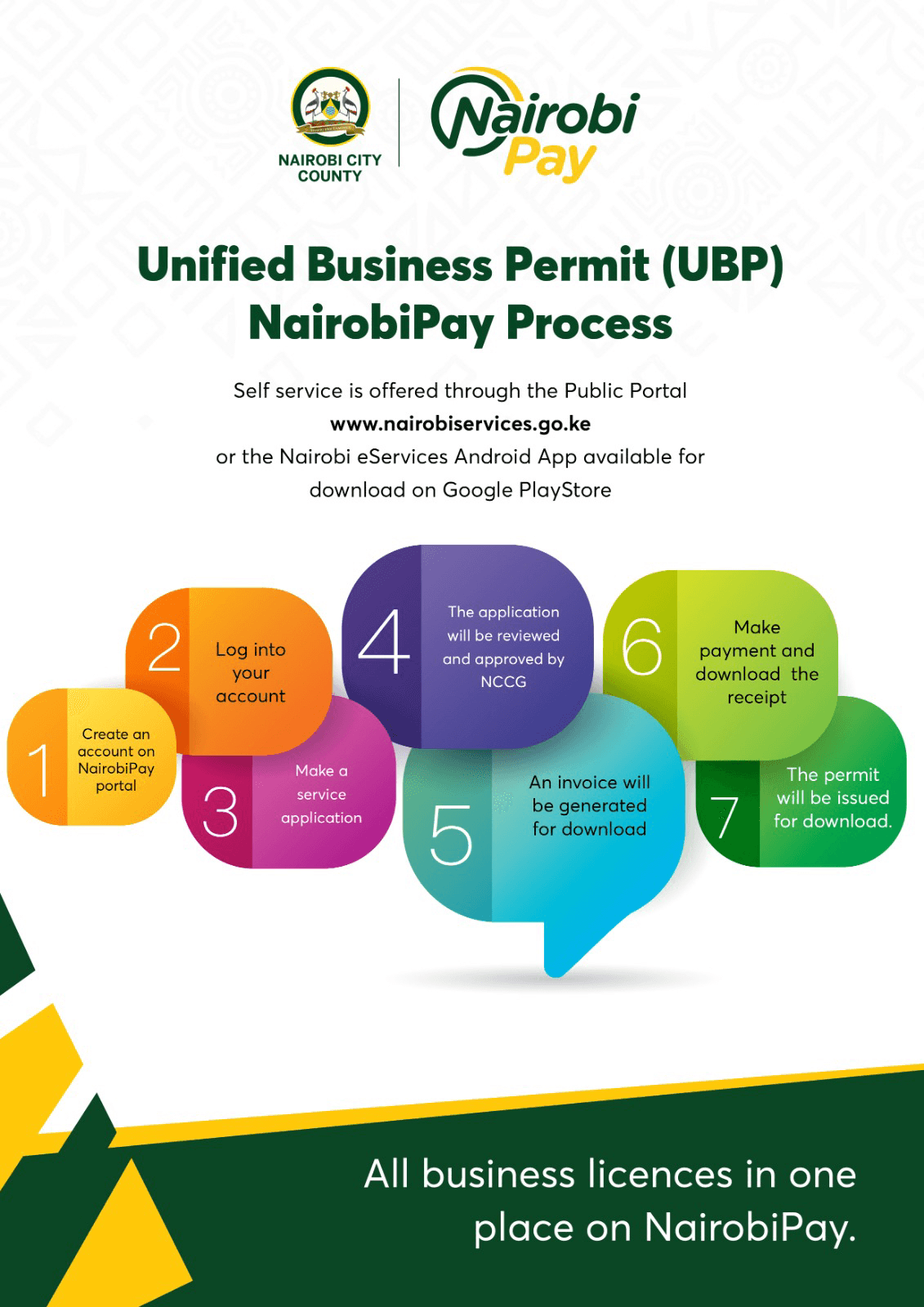
To legally trade in Nairobi, you need a Unified Business Permit (UBP), applied for and paid entirely online through the NairobiPay eServices Portal. This single permit replaces separate trading, fire safety, health, and signage licenses, and the county now runs a strict no-cash policy, so every payment happens digitally. This guide is for anyone registering a new business in Nairobi or renewing an existing permit, and it walks through the documents, costs, steps, and a 2026 youth waiver update worth knowing about before you pay.
- Key Information at a Glance
- What You Need
- Step-by-Step Application Process
- What Happens After You Apply
- How to Check Your Application Status
- Common Problems and Solutions
- Estimated Annual Permit Fees by Category
- The 2026 Youth Business Permit Waiver: What It Actually Covers
- Important Compliance Rules
- Frequently Asked Questions
- How much does a Nairobi business permit cost?
- Can I pay for my UBP in cash?
- Do new startups get a discount in 2026?
- What happens if I don’t renew my permit on time?
- Does the UBP cover health and fire safety certificates automatically?
- Can I apply for a Nairobi business permit if I’m outside Kenya?
- Bottom Line
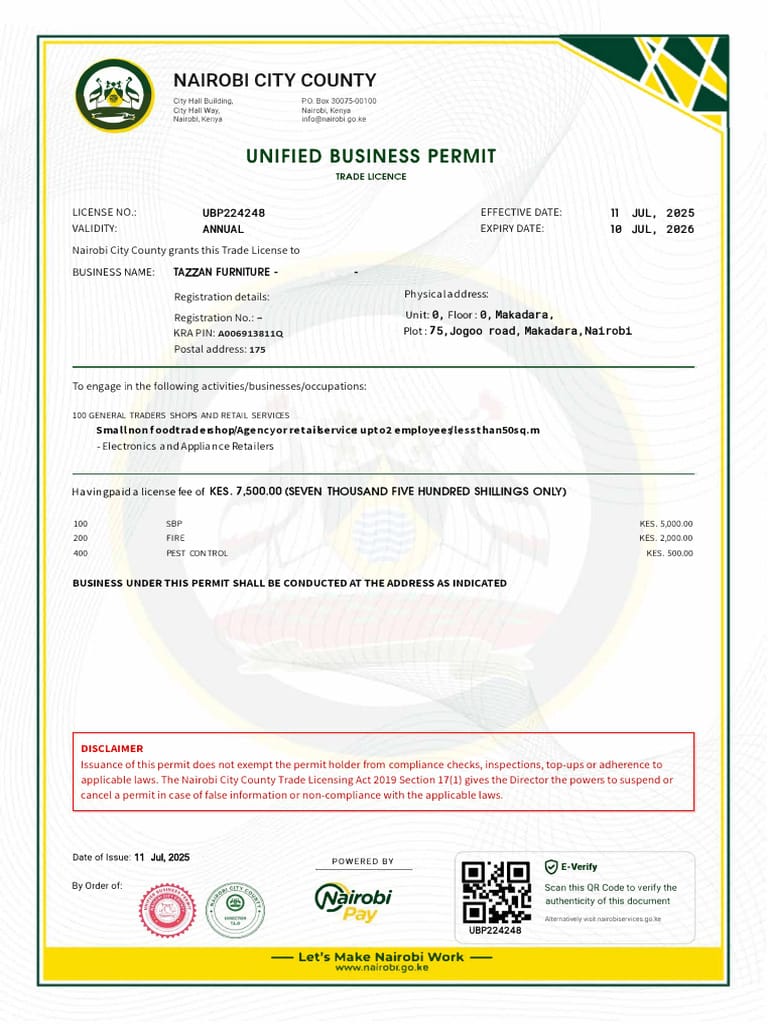
Nairobi’s Unified Business Permit combines trading, fire, health, and signage licenses into one annual fee, paid entirely online through NairobiPay.
Key Information at a Glance
| Detail | Information |
|---|---|
| Cost | KSh 200 flat application fee, plus KSh 3,500 to KSh 500,000+ depending on business size and category |
| Processing time | Same day to a few working days once documents and payment are verified |
| Platform | NairobiPay eServices Portal (nairobiservices.go.ke) |
| Eligibility | Any legally registered business operating within Nairobi City County |
| Payment methods | M-Pesa, USSD *647#, or bank transfer via Equity or Co-operative Bank (no cash accepted) |
| Renewal window | Typically January to March, sometimes opening in the final weeks of the prior year |
What You Need
Before you start the application, prepare digital copies of the following. Everything is uploaded during the process, so scan or photograph clear, legible versions in advance.
- National registration: your Certificate of Incorporation or Business Name Registration Certificate, obtained through the Business Registration Service (BRS) on eCitizen.
- Tax compliance: your business’s KRA PIN certificate.
- Premises proof: a lease agreement, rent receipt, or proof of ownership for your business location.
- Identification: the National ID or passport of the business director or owner.
- Active phone number and email for OTP verification and invoice notifications.
Step-by-Step Application Process
- Access the portal. Visit the NairobiPay eServices Portal directly, or log into your Nairobi County account through eCitizen if you’ve linked it previously.
- Create an account. New users register with a phone number and email, then verify via a One-Time PIN (OTP) sent by SMS or email.
- Navigate to licensing. From the Services menu, select Business Licensing Services.
- Enter your business details. Input your business name, BRS registration number, physical address, floor area, and number of employees. Getting the business classification exactly right matters here. An incorrect category can trigger miscalculation penalties later, even if the mistake was accidental.
- Upload your documents. Attach the Certificate of Incorporation or Business Name Registration, KRA PIN certificate, premises proof, and ID.
- Review the fee assessment. The portal generates an electronic invoice automatically based on your business type, size, and category.
- Pay the invoice. Use the M-Pesa prompt, dial the USSD code *647#, or pay via bank transfer to the county’s Equity Bank or Co-operative Bank revenue collection accounts. Cash is not accepted at any stage of this process.
- Download and display your permit. Once payment clears and your documents are verified, download the digital Unified Business Permit immediately. By law, you must print it and display it visibly inside your premises.
What Happens After You Apply
Once you submit payment, the system typically verifies your documents and business details within the same working day for straightforward applications, though this can extend to a few days if your category requires additional review, such as businesses needing fire or health certification as part of the UBP. You’ll receive a notification by SMS or email once your permit is approved and ready. At that point, log back into the portal, go to your dashboard, and download the permit as a PDF for printing.
Certain business types, particularly food establishments, manufacturers, and businesses handling hazardous materials, commonly get scheduled for a physical inspection after the digital permit is issued, since the UBP folds in fire safety and health certification that require an actual site visit to confirm.
How to Check Your Application Status
Log into your NairobiPay account and navigate to your dashboard or “My Applications” section. Your permit’s status will show as pending, under review, or approved. If your application has stalled for more than a few working days without movement, this usually means a document issue or a mismatch between your entered details and your BRS registration, and it’s worth contacting the county directly rather than waiting indefinitely.
Common Problems and Solutions
Problem: Payment failed or didn’t reflect on the portal.
Solution: Check your M-Pesa or bank transaction confirmation first. If the money left your account but the portal still shows unpaid, wait a few hours for reconciliation before resubmitting, since duplicate payments can complicate refunds. If it’s still unresolved after 24 hours, contact NairobiPay support with your transaction reference.
Problem: Wrong business category selected, leading to an incorrect fee.
Solution: Contact the licensing department through the portal or visit a City Hall Annex office to request a category correction before paying, if possible. If you’ve already paid, you may need to apply for a fee adjustment rather than starting over.
Problem: OTP verification code not arriving.
Solution: Confirm your phone number was entered correctly and check for network delays. If it still doesn’t arrive after several minutes, try the email verification option instead, or clear your browser cache and retry registration.
Problem: Documents rejected during upload.
Solution: Ensure files are clear, correctly oriented, and under the portal’s file size limit, usually a few megabytes per document. Blurry scans or photos taken at an angle are the most common cause of rejection.
Estimated Annual Permit Fees by Category
These figures are indicative and approximate only. Your actual fee is assessed automatically by the NairobiPay portal based on your exact business category, floor area, employee count, and the tariffs currently in force. Nairobi County’s 2025-2030 Tariffs and Pricing Policy has been shifting permit classification toward a more precise size- and cost-based model, so don’t treat the ranges below as fixed. Confirm the exact figure on your own invoice.
| Business Category | Indicative Annual Fee (KSh) |
|---|---|
| Application fee (flat rate for everyone) | KSh 200 |
| Small informal trader (e.g., street vendor) | ~KSh 3,500 |
| Small trader shop (up to 4 employees) | ~KSh 4,000 |
| Medium business (5-10 employees) | KSh 7,500 – 15,200 |
| Large business (50+ employees) | KSh 30,000 – 100,000+ |
| Manufacturing and industrial | KSh 50,000 – 500,000+ |
The 2026 Youth Business Permit Waiver: What It Actually Covers
This is worth getting right, since it’s easy to overstate. In January 2026, at the NYOTA fund disbursement event in Kasarani, Governor Sakaja announced a two-year business permit and licence fee waiver, but specifically for beneficiaries of the National Youth Opportunities Towards Advancement (NYOTA) programme, a World Bank-financed youth business grant initiative, not a blanket waiver for every new startup in Nairobi.
It’s also worth knowing this rollout hit real delays. As of April 2026, the Ministry of Cooperatives and MSME Development confirmed the waiver’s implementation was still pending in several counties due to the lack of a structured framework and incomplete beneficiary data. If you received NYOTA funding and are registering a business in Nairobi, check your specific eligibility and the waiver’s current status directly through NairobiPay or your NYOTA program contact before assuming it applies automatically or before paying the standard fee. Don’t assume this waiver applies simply because you’re launching a new business without a NYOTA connection.
Important Compliance Rules
A few rules apply regardless of your business category, and missing them causes more trouble than the application process itself.
- Annual expiry: every UBP expires strictly on December 31st each year, no matter when during the year you originally purchased it.
- Renewal timeline: submit your renewal through the portal between January and March, though the online renewal window can open earlier, sometimes in the final weeks of the prior year. Late renewals incur a penalty, commonly cited as a progressive rate applied monthly (some sources reference roughly 3% per month under current trade licensing rules). The exact rate is set by the applicable Finance Act and Trade Licensing Act provisions in force at the time, so confirm the precise figure shown on your invoice rather than relying on any fixed percentage.
- Physical inspections: public health officers, fire marshals, or county inspectors may visit your business after permit issuance to verify safety compliance and confirm your declared business size matches reality. A mismatch here, understating employee count or floor area to reduce your fee, can result in fines beyond the standard penalty structure.
- Integrated certificates matter individually: even though the UBP is one combined permit, failing to meet the standards for one component, like fire safety, can invalidate that part of your permit even while the rest remains valid.
Related:How to Apply for AGPO in Kenya (2026 Guide)
—How to Apply for Government Tenders in Kenya (2026)
Frequently Asked Questions
How much does a Nairobi business permit cost?
It depends on your business size and category, ranging from around KSh 3,500 for a small informal trader to over KSh 500,000 for large manufacturing operations, plus a flat KSh 200 application fee for everyone. These are indicative figures; your exact fee is assessed by the portal.
Can I pay for my UBP in cash?
No. Nairobi City County operates a strict no-cash policy for all revenue collection, including business permits. Payment must go through M-Pesa, USSD, or an authorized bank transfer.
Do new startups get a discount in 2026?
Only if you’re a beneficiary of the NYOTA youth business fund. Governor Sakaja announced a two-year permit waiver specifically for NYOTA recipients in January 2026, not a general waiver for all new businesses, and its rollout faced implementation delays in several counties through mid-2026. If you’re a NYOTA beneficiary, confirm current status directly through NairobiPay or your program contact.
What happens if I don’t renew my permit on time?
You’ll face a late penalty applied under the county’s current Finance Act and Trade Licensing Act provisions, commonly cited as a progressive monthly rate. The permit itself expires on December 31st regardless of when you first purchased it, so confirm the exact penalty figure on your renewal invoice.
Does the UBP cover health and fire safety certificates automatically?
Yes, the Unified Business Permit consolidates trading license, fire safety clearance, health certification, and outdoor signage approval into one fee, though certain business types commonly still require a physical inspection to confirm compliance for these components.
Can I apply for a Nairobi business permit if I’m outside Kenya?
Yes, as long as you can access the NairobiPay portal, complete OTP verification with a working phone number, and arrange payment through one of the accepted digital methods. You don’t need to be physically present in Nairobi to submit the application, though inspections for certain business types will still require someone present at the physical premises.
Bottom Line
Getting a Nairobi business permit comes down to having your national registration and tax documents ready, applying through NairobiPay rather than in person, and paying digitally since cash isn’t accepted anywhere in the process. Get your business category right the first time to avoid penalty corrections later, mark your renewal window for January to March every year, and if you’re a NYOTA fund beneficiary, check the youth waiver’s current status before paying anything. The full official process and any updates to fees or eligibility are maintained on Nairobi City County’s own site.
Sources: NairobiPay eServices Portal, Nairobi City County (No-Cash Policy Notice), Nairobi City County (UBP Overview), Capital News (NYOTA Waiver Announcement), Kenyans.co.ke (Waiver Rollout Delays)